A countdown timer shows a running clock to a deadline or start time. Days, hours and minutes ticking down on the screen make a date feel real in a way plain text does not. The swipes below use timers on challenge sign-ups, workshop pages, membership offers and thank-you pages, where a 15-minute window turns a fresh sign-up into a buyer.
A written deadline is easy to ignore. A clock that moves is not. Each second that ticks makes the cost of waiting visible. Timers work best above or next to the main button, so the reader sees the deadline and the action together. They also suit start times, such as a live class or a challenge beginning, which helps people show up. The big rule is that the timer must be real. A clock that resets on reload, or a deadline that quietly extends, teaches visitors to ignore every timer you show. Pair the timer with a reason: the doors close, the price rises or the class starts.
2How to use it in your copy
Set a real deadline or start time.
Place the timer near the headline or the main button.
Say what happens when it reaches zero.
Make sure it does not reset when the page reloads.
Honour the deadline when the clock runs out.
3Mistakes to avoid
Using an evergreen timer that resets for each visitor.
Putting a timer on an offer with no real deadline.
Showing a timer without saying what it counts down to.
One saved ad, email or sales page every week, with a short note on why it works and how to use the idea in your own copy. Free, one email, unsubscribe any time.
Sent with Systeme.io, which we also recommend for building pages like these.






 21-Day Meditation Challenge page with countdownA running countdown above a single yellow button creates urgency and leaves one obvious action.
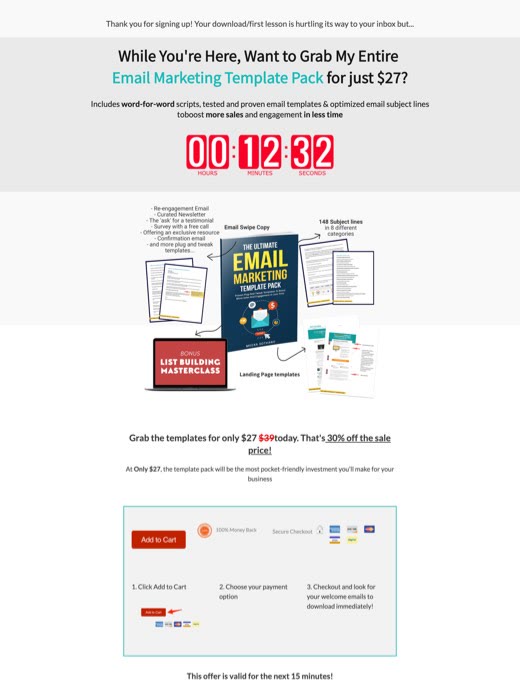 Meera Kothand's email template thank-you offerA thank-you page offer comes with a countdown and a 15-minute validity line, so a fresh sign-up decides now.
 Wellnio webinar registration confirmation pageAfter registration, a countdown to the class keeps the start time on the attendee's mind.